Autor Tema: Ayuda con teclado matricial 4x4 y comunicacion serie  (Leído 5501 veces)

0 Usuarios y 1 Visitante están viendo este tema.

Desconectado mundotronic

  • PIC16
  • ***
  • Mensajes: 142
    • mundotronic CNC
Ayuda con teclado matricial 4x4 y comunicacion serie
« en: 24 de Noviembre de 2008, 14:46:25 »
Buenos dias muchachos, soy nuevito en el foro y en la electronica, por ahora solo estoy con un hilo construyendo mi primer CNC (Arranque con mi CNC) y este me parecio el mas indicado para preguntar sobre el teclado ya que el codigo lo hice en PBP.
Hice un teclado matricial 4x4 pero tengo muchas dudas ya que no funciona como quiero. La idea es el teclado matricial y leer con un pic16f628a la tecla pulsada y enviar en serie a otro pic para por ejemplo mostrarlo en un LCD de 2x16.
Lo que hace mi teclado es mandar cualquier tecla y mostrar continuamente en el LCD lo que manda sin que yo pulse una bendita tecla, pero si pulso una tecla tambien se muestra en el LCD y luego sigue mostrando cualquier cosa.

El codigo en PBP del que lee el teclado es este:


'****************************************************************
'*  Name    : teclado.BAS                                       *
'*  Author  : [Mundotronic]                                     *
'*  Notice  : Copyright (c) 2008 [select VIEW...EDITOR OPTIONS] *
'*          : All Rights Reserved                               *
'*  Date    : 03/10/2008                                        *
'*  Version : 1.0                                               *
'*  Notes   :                                                   *
'*          :                                                   *
'****************************************************************
include  "modedefs.bas"
define osc 4
TRISB = %11110000
TRISA = %11101110

fila1 var portb.3
fila2 var portb.2
fila3 var portb.1
fila4 var portb.0
colu1 var portb.4
colu2 var portb.5
colu3 var portb.6
colu4 var portb.7
led var porta.4
tx var porta.0
fila1=0
fila2=0
fila3=0
fila4=0
colu1=0
colu2=0
colu3=0
colu4=0
led=0

Principal:

fila1=1
if colu1=1 then gosub send1
if colu2=1 then gosub send2
if colu3=1 then gosub send3
if colu4=1 then gosub senda
fila1=0

fila2=1
if colu1=1 then gosub send4
if colu2=1 then gosub send5
if colu3=1 then gosub send6
if colu4=1 then gosub sendb
fila2=0

fila3=1
if colu1=1 then gosub send7
if colu2=1 then gosub send8
if colu3=1 then gosub send9
if colu4=1 then gosub sendc
fila3=0

fila4=1
if colu1=1 then gosub send_ast
if colu2=1 then gosub send0
if colu3=1 then gosub send_num
if colu4=1 then gosub sendd
fila4=0

goto principal

send1:
serout tx,N1200,["1"]
HIGH led
pause 200
LOW led
return

send2:
serout tx,N1200,["2"]
HIGH led
pause 200
LOW led
return

send3:
serout tx,N1200,["3"]
HIGH led
pause 200
LOW led
return

send4:
serout tx,N1200,["4"]
HIGH led
pause 200
LOW led
return

send5:
serout tx,N1200,["5"]
HIGH led
pause 200
LOW led
return

send6:
serout tx,N1200,["6"]
HIGH led
pause 200
LOW led
return

send7:
serout tx,N1200,["7"]
HIGH led
pause 200
LOW led
return

send8:
serout tx,N1200,["8"]
HIGH led
pause 200
LOW led
return

send9:
serout tx,N1200,["9"]
HIGH led
pause 200
LOW led
return

send0:
serout tx,N1200,["C"]
HIGH led
pause 200
LOW led
return

senda:
serout tx,N1200,["A"]
HIGH led
pause 200
LOW led
return

sendb:
serout tx,N1200,["B"]
HIGH led
pause 200
LOW led
return

sendc:
serout tx,N1200,["C"]
HIGH led
pause 200
LOW led
return

sendd:
serout tx,N1200,["D"]
HIGH led
pause 200
LOW led
return

send_ast:
serout tx,N1200,["S"]
HIGH led
pause 200
LOW led
return

send_num:
serout tx,N1200,["N"]
HIGH led
pause 200
LOW led
return

El codigo del pic receptor es este:

'****************************************************************
'*  Name    : teclado receptor.BAS                              *
'*  Author  : [Mundotronic]                                     *
'*  Notice  : Copyright (c) 2008 [select VIEW...EDITOR OPTIONS] *
'*          : All Rights Reserved                               *
'*  Date    : 04/07/2008                                        *
'*  Version : 1.0                                               *
'*  Notes   :                                                   *
'*          :                                                   *
'****************************************************************
Include "modedefs.bas"
TRISB = %11100111
TRISA = %11100000
Define  LCD_DREG        PORTA
Define  LCD_DBIT        0
Define  LCD_RSREG       PORTA
Define  LCD_RSBIT       4
Define  LCD_EREG        PORTB
Define  LCD_EBIT        3
DEFINE  OSC 4

DATO VAR byte
PAUSE 1000
LCDOUT $FE, 1
LCDOUT "Ingrese Codigo:"
LCDOUT $FE, $C0

MAIN:
SERIN PORTB.4,N1200,DATO
if dato="S" then dato="*"
if dato="N" then dato="#"

if dato<>"0" then
LCDOUT $FE, $0F
if dato="C" then
lcdout "0"
pause 199
else
lcdout dato
pause 199
endif
endif
GOTO MAIN

Adjunto el esquema del teclado por si tambien esta mal el hardware:
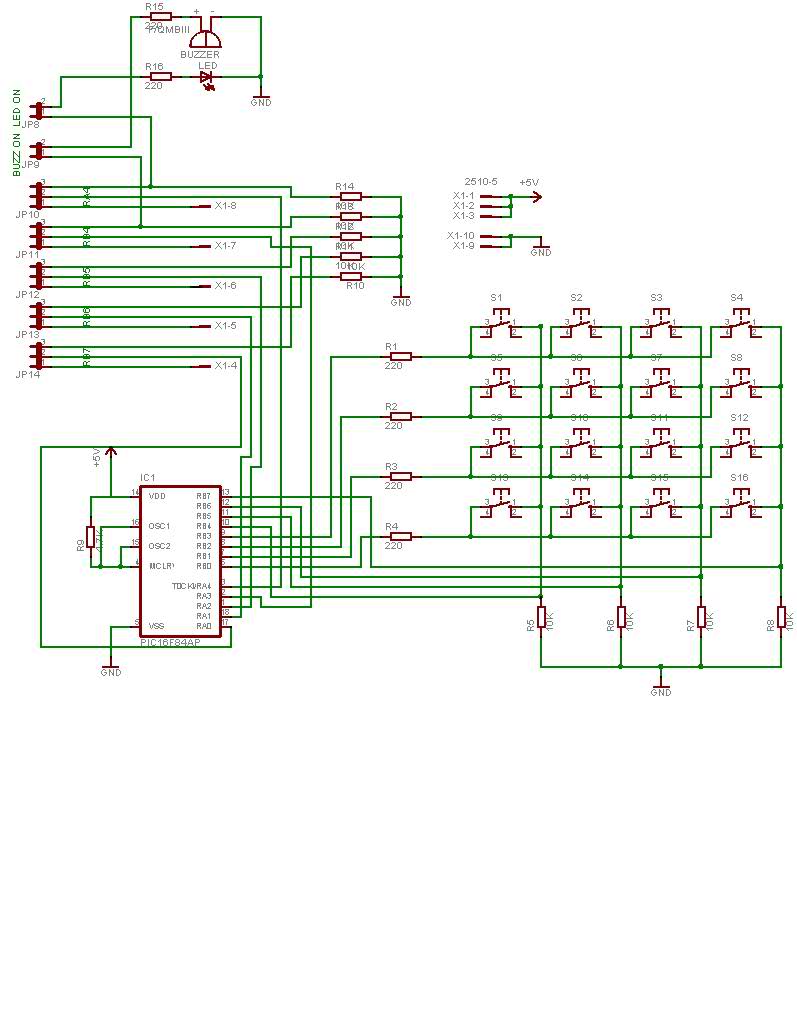


Sera problema del hardware, del software o de ambos?

Por favor toda ayuda sera bienvenida!

Saludos y gracias de antemano! :-/

« Última modificación: 24 de Noviembre de 2008, 14:50:37 por mundotronic »
El que parte hacia una batalla sabiendo que tiene un mayor poderio que su rival, no es un combativo sino un oportunista...

Desconectado sandra

  • Colaborador
  • PIC18
  • *****
  • Mensajes: 374
Re: Ayuda con teclado matricial 4x4 y comunicacion serie
« Respuesta #1 en: 24 de Noviembre de 2008, 18:55:16 »
M ira aquí te pongo un ejemplo de una matriz 8x5 que estoy asiendo funciona bien y no tengo ningún problema con ella.
El que te mande continuamente el numero de una tecla  pudiera ser por que hay rutinas de teclado que te indican que no hay tecla pulsada enviando un numero en el caso de mi rutina es 128 .
Envía constante mente 128 indicando con este número que no hay  tecla pulsada,
Si miras  el código veras que esto se resuelve indicándole al  pic que si no ay tecla pulsada no mande nada por  tx.
Ahora otra recomendación es que algunas veces  la transmisión serial puede estarte enviando basura.
Esto se resuelve indicándole al receptor que no reciba nada sino recibe primero un carácter especifico que en mi caso es  @ .

Otra posible causa es la sincronización entre el pic que transmite y el  pic que resive lo que se resuelve con un pin extra en cada pic  que en mi caso se llama  strobe cuando el pic que transmite esta listo para enviar el dato de la tecla pulsada pone este pin en alto .


Otra posible causa es el efecto de rebote de las teclas lo cual hay que resolverlo por  hardware o software


Espero que te sirva
Un saludo


' ** Setup the Crystal Frequency, in Mhz **
    Device 16F872

   XTAL 4      ' Set Xtal Frequency

' ** Setup the Debug Defines **
Declare RSOUT_PIN PORTC.6
Declare RSOUT_MODE 0
Declare SERIAL_BAUD 4800


' ** Define LCD Control Constants *


' ** Declare the Variables **

Dim   Flag As Bit      
Dim   Key    As   Byte
Dim   Debounce As   Bit         ' Flag to indicate a keypress.
Dim   D_Flag    As    Bit         ' Debounce flag used by Inkeys.


Symbol strobe= PORTC.7


Main:   
   GoSub Keyscan
     If Key=128 Then Main
     High strobe
     DelayMS 50
     RSOut "@"
     DelayMS 1                   
   RSOut  Dec Key
   Low strobe
   GoSub led
   GoTo Main

' This subroutine Scans the 12 button keypad and returns the key pressed in "KEY"
' If no key is pressed the value returned is 128.
' It also returns a Bit-Flag called "DEBOUNCE" which is 1 if a key is still in use
' And 0 if not. This acts as a debounce for the Keypad.
Keyscan:
   Debounce=1            ' Setup the initial value for Debounce
   Key=0               ' Clear the variable KEY, prior to scanning
   TRISA.0=0:TRISA.1=0         ' Make the first four bits of PortA Outputs
   TRISA.2=0:TRISA.3=0
   TRISA.4=0
             
   TRISB.0=1:TRISB.1=1         ' Make the first three bits of PortB inputs
   TRISB.2=1:TRISB.3=1
   TRISB.4=1:TRISB.5=1
   TRISB.6=1:TRISB.7=1
   OPTION_REG.7=0            ' Enable Internal PortB Pullup Resistors   
   PORTA=%01111            ' Pull the fourth Row line LOW
   GoSub ScanCol            ' Scan the Columns
   If Flag=1 Then GoTo Map         ' If a key is pressed then map it
   PORTA=%10111            ' Pull the third Row line LOW
   GoSub ScanCol            ' Scan the Columns
   If Flag=1 Then GoTo Map         ' If a key is pressed then map it
   PORTA=%11011            ' Pull the second Row line LOW
   GoSub ScanCol            ' Scan the Columns
   If Flag=1 Then GoTo Map         ' If a key is pressed then map it
   PORTA=%11101            ' Pull the first Row line LOW
   GoSub ScanCol            ' Scan the Columns
   If Flag=1 Then GoTo Map         ' If a key is pressed then map it
    PORTA=%11110            ' Pull the fourth Row line LOW
   GoSub ScanCol            ' Scan the Columns
   If Flag=1 Then GoTo Map         ' If a key is pressed then map it


   D_Flag=0            ' No key pressed, so Reset debounce flag
   Debounce=0                  ' No key pressed, so Reset key Debounce flag
   GoTo Exit            ' Exit from the subroutine
' Do the following code if a key has been pressed
Map:     If D_Flag=1 Then Exit       ' Already responded to this press, so exit
     D_Flag=1            ' Set Debounce flag
     Debounce=0             ' Reset key Debounce flag
Exit:   LookUpL Key,[31,6,36,1,16,11,21,26,32,7,37,2,17,12,22,27,33,8,38,3,18,13,23,28,34,_ ' Map of the keypad legends for numeric output
                    9,39,4,19,14,24,29,35,10,40,5,20,15,25,30,128],Key

   Return               ' Exit from the subroutine

' This subroutine scans the Columns
' The bit, "FLAG" returns a 1 if a key is pressed, and 0 if no key pressed
' Also, if no key is pressed the variable "KEY" will return with the value of 12
ScanCol:
   Flag=1               ' Set Flag initially to 1
   If PORTB.0=0 Then S_Exit      ' Return if a key on the first column is pressed
   Key=Key+1            ' Else increment KEY, and try another row
   If PORTB.1=0 Then S_Exit      ' Return if a key on the second column is pressed
   Key=Key+1            ' Else increment KEY, and try another row
   If PORTB.2=0 Then S_Exit      ' Return if a key on the third column is pressed
   Key=Key+1            ' Else increment KEY, KEY now equals 12
   If PORTB.3=0 Then S_Exit      ' Return if a key on the third column is pressed
   Key=Key+1            ' Else increment KEY, KEY now equals 12
   If PORTB.4=0 Then S_Exit      ' Return if a key on the third column is pressed
   Key=Key+1            ' Else increment KEY, KEY now equals 12
   If PORTB.5=0 Then S_Exit      ' Return if a key on the third column is pressed
   Key=Key+1            ' Else increment KEY, KEY now equals 12
   If PORTB.6=0 Then S_Exit      ' Return if a key on the third column is pressed
   Key=Key+1            ' Else increment KEY, KEY now equals 12
   If PORTB.7=0 Then S_Exit      ' Return if a key on the third column is pressed
   Key=Key+1            ' Else increment KEY, KEY now equals 12   
   Flag=0               ' Set the flag to indicate no key pressed
S_Exit:   Return               ' And exit the subroutine

led:
High PORTC.0
High PORTC.1
DelayMS 110
Low PORTC.0
Low PORTC.1
DelayMS 110
Return


« Última modificación: 24 de Noviembre de 2008, 18:59:56 por sandra »
El pesimista se queja del viento
El optimista espera que cambie
El realista ajusta las velas

Desconectado mundotronic

  • PIC16
  • ***
  • Mensajes: 142
    • mundotronic CNC
Re: Ayuda con teclado matricial 4x4 y comunicacion serie
« Respuesta #2 en: 25 de Noviembre de 2008, 15:40:14 »
Gracias sandra por tu ayuda, en cuanto tenga un tiempo pruebo el codigo que pasaste y modifico el mio para que envie el caracter de arranque que me decis. Vos crees que el esquema esta bien?, No hay problemas con las resistencias?.

Saludos! :-/
El que parte hacia una batalla sabiendo que tiene un mayor poderio que su rival, no es un combativo sino un oportunista...

Desconectado sandra

  • Colaborador
  • PIC18
  • *****
  • Mensajes: 374
Re: Ayuda con teclado matricial 4x4 y comunicacion serie
« Respuesta #3 en: 25 de Noviembre de 2008, 16:59:23 »
Pues mira así de pasada no le miro mal solo cabe mencionar que yo utilizo las resistencias pull up internas del puerto b y las resistencias limitadoras de i no las utilizo y me  va bien el teclado.
Algo que olvide mencionar es que no pongas mucha atención  a la rutina de  lookupl la tuve que utilizar solo para configurar a mi gusto el valor de cada tecla ya que el teclado es de una vieja calculadora y la matriz esta arreglada de una forma no estándar así que para no perder tiempo lo resolví  de esta manera
Suerte
El pesimista se queja del viento
El optimista espera que cambie
El realista ajusta las velas


anything